Complete Guide to Face Filter AI for Streaming (2026)
From concept to stream - build polished 3D avatars that scale your brand

How FaceFilter AI works
FaceFilter AI leverages advanced computer vision and machine learning directly in your browser to track your facial expressions in real-time. No expensive hardware is required - just your webcam.
Building your model
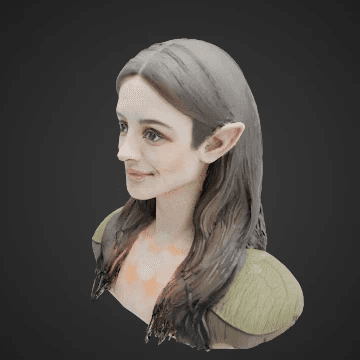
The process begins by either uploading a 2D reference image of your desired avatar or providing a detailed text prompt describing your ideal character. Within minutes, our platform generates a detailed 3D model tailored to your specifications.
From there, you are given creative control over the facial landmark positions, sizes and quantities. You can customise the positions, physiological scales, and rotations of individual landmark features—such as the eyes, eyebrows, and mouth. Whether you are aiming for a highly realistic human representation or a fantastical, stylised creature with 3 eyes or 4 mouths, the intuitive landmark editor helps you build your creative vision!

Image
Upload a 2D image or choose from the gallery and suggestions
Model
Generate your 3D model and apply landmarks using the editor

Stream
Host your model and stream via streaming software
Streaming
The stream is displayed in a separate window, for use by streaming software such as OBS Studio or Streamlabs. This allows you to overlay your avatar onto your live broadcast with ease. The preview window must be displayed at all times to keep the tracking active, so we recommend a two monitor setup for the best experience.
Our technology maps distinct facial landmarks to a 3D avatar rig, capturing every smile, wink, and nod with low latency. This video feed is then composed with a transparent background, making it ready to overlay directly into your streaming software.
Setup Instructions
Follow our interactive guide below to integrate FaceFilter AI with OBS Studio, Streamlabs, or other broadcast tools.
Get started!
Follow these three simple steps to set up Face Filter AI with your preferred streaming software.
Download from the official site
Prepared configuration file
Quick Setup
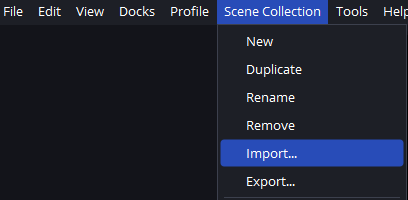
- In OBS Studio, click the Scene Collection menu bar, then Import...
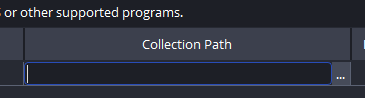
- Click the '...' in Collection Path and open the config file downloaded above.
Optimizing for Performance
For the smoothest experience, we recommend running FaceFilter AI on a dedicated monitor if possible. Ensure your lighting is consistent, as good lighting helps the webcam tracker maintain a stable lock on your facial features.
Ready to transform your stream?
Join creators using FaceFilter AI to build their brand. Get started in minutes.
Start generating for free →